SC-OBC Module V1 FPGA Developers Guide
Introduction
The SC-OBC Module V1 is a space-grade single-board computer that integrates the AMD Versal AI Edge Series VE2302 as its main processor. AMD Versal is a high-performance device implementing a heterogeneous computing (Adaptive SoC) architecture that combines a CPU, FPGA, and AI Engine. It enables efficient processing of large-scale sensor data—such as optical sensors, SAR, and LiDAR—including input preprocessing, hardware acceleration, vector-based edge computing, and high-capacity data recording.
A Microchip IGLOO2 device is implemented as a safety processor to perform health monitoring of the main processor. The hardware is composed of radiation-tolerant devices and industrial-grade components with proven radiation resistance, ensuring high reliability in space environments.
This document provides the technical information required to develop the FPGA design for the SC-OBC Module V1.
This document applies to the following product version:
| Product Name | Model Number |
|---|---|
SC-OBC Module V1 |
SC-OBC-V1001 |
|
This document assumes that the reader has basic knowledge of FPGA development. Therefore, the following topics are not covered:
For details on these topics, refer to the documents listed in the References section. |
Required Development Tools
The following tools are required to develop the FPGA and update the safety processor firmware on the SC-OBC Module V1:
-
Main Processor (Versal) development: Vivado
-
Safety Processor firmware updates: Libero SoC (using the included FlashPro Express)
Getting Started
This chapter provides the steps required to perform the following tasks:
-
Download the FPGA development environment for the SC-OBC Module V1
-
Build the design using the configuration for the Evaluation Board (EVB1001) provided by Space Cubics, and generate the Versal boot image files PDI (Programmable Device Image) and XSA (Xilinx Support Archive)
Main Processor (Versal) Development
This chapter describes how to develop the Main Processor implemented with the Versal device.
The provided development environment is configured with the standard features enabled for the SC-OBC Module V1 as implemented on the onboard hardware. Users can extend this environment by adding the functions required for their mission, enabling them to implement the capabilities needed for their spacecraft.
Directory Structure of the Development Environment
Before building, the Versal development environment has the following structure:
 versa               # Main Processor (Versal) FPGA project
  ├─ rtl/            # RTL sources
  ├─ ip/             # IP core configuration files
  ├─ constraints/    # Design constraint files
  ├─ script/         # Build scripts
  └─ work/           # **Generated after the first build**
        └ implement   # Work directory for FPGA implementation
When running make implement inside the versal directory, a work/implement/project directory is created.
Vivado generates and expands the full set of project files inside this project directory.
Design Flow
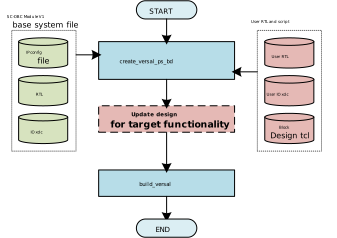
The development of the Versal on the SC-OBC Module V1 can be carried out in two ways: using the Vivado GUI or using the command-line flow with RTL and Tcl scripts.
The Makefile included in the development environment provides two main targets:
create_versal_ps_bd and build_fpga.
The following diagram illustrates the primary development flow for the SC-OBC-V1 FPGA.
GUI Design Flow
This method uses the Vivado GUI for design work.
First, run the create_versal_ps_bd target, then open and modify the Vivado project as needed.
The project can be opened using the following commands:
cd versal/work/implement
vivado project/sc_obc_v1_versal.xpr
After completing the design in Vivado, close the application and run the build_fpga target.
This will export the .pdi and .xsa files generated from your design.
|
When using this flow, running |
CLI Design Flow
This method uses RTL and Tcl scripts for design.
The create_versal_ps_bd target includes entry points for loading RTL files and executing user scripts.
The following files are provided for users to add RTL or Tcl-based design logic:
-
rtl/user_rtl.list Lists the user RTL files to be loaded by Vivado. Any RTL added to this file is automatically included during the build.
-
script/implement/user_bd_logic.tcl A Tcl script for applying custom logic to the Block Design hierarchy. This script is executed at the end of the Block Design generation process.
-
constraints/sc-obc-v1-versal-user-io.xdc Constraint file for user-defined I/O. Used to specify pin assignments, pad numbers, I/O buffer configurations, drive strengths, and other I/O-related settings.
Processing System Development
The Processing System (PS) can be customized by modifying the configuration of the CIPS (Control, Interfaces & Processing System), allowing users to implement their own functions.
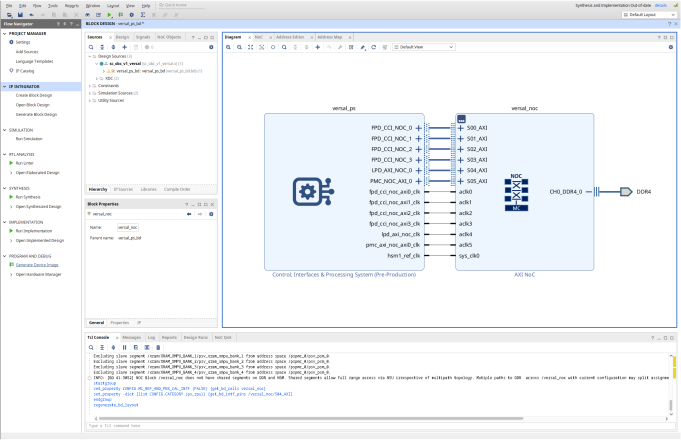
Within the Block Design hierarchy sc_obc_v1_versal, the CIPS is instantiated under the name versal_ps.
In the GUI design flow, you can modify the CIPS configuration by opening the Block Design and selecting Re-customize IP for the versal_ps instance.
In the CLI design flow, the configuration can be changed by overriding the properties of versal_ps as shown in the following example:
set_property -dict [list CONFIG.PS_PMC_CONFIG { \
    PS_MIO0  {{USAGE GPIO} {DIRECTION inout} {DRIVE_STRENGTH 12mA} {OUTPUT_DATA default} {PULL pulldown} {SCHMITT 0} {SLEW fast}}} \
] [get_bd_cells versal_ps]
Programmable Logic Development
All Programmable Logic (PL) in the SC-OBC Module V1 is fully accessible to the user, allowing mission-specific functions to be freely implemented to meet spacecraft requirements.
Programmable Logic Resources
The Programmable Logic of the SC-OBC Module V1 provides access to the following resources:
| Category | Item | Resource |
|---|---|---|
AI Engine |
AI Engine-ML Tiles |
32 |
AIE/AIE-ML Data Memory (Mb) |
17 |
|
AIE-ML Shared Memory (Mb) |
68 |
|
Programmable Logic |
System Logic Cells |
328,720 |
LUTs |
150,272 |
|
DSP Engines |
464 |
|
NoC Master / NoC Slave Ports |
5 |
|
Distributed RAM (Mb) |
4.6 |
|
Memory |
Total Block RAM (Mb) |
5.4 |
UltraRAM (Mb) |
43.6 |
|
Accelerator RAM (Mb) |
32 |
|
Serial Transceivers |
GTYP Transceivers |
8 |
Integrated Protocol IP |
PCI Express |
1 × Gen 4 × 8 |
40G Multirate Ethernet MAC |
1 |
|
IO |
HDIO |
22 |
XPIO |
54 |
|
GTYP |
8 |
Programmable Logic Design Method
Designing the PL involves modifying the Block Design hierarchy or the top-level module (sc_obc_v1_versal.v).
This approach follows the standard AMD MPSoC/FPGA design methodology.
For more information on Versal design techniques, refer to the Versal Adaptive SoC Design Guide.
IO Configuration
Users can utilize 22 HDIO pins, 54 XPIO pins, and 8 GTYP transceiver interfaces as IO connected to the Programmable Logic (PL).
HDIO Resource List
HDIO (High-Density I/O) includes resources that support low-speed SDR and DDR interfaces. It supports I/O standards corresponding to bank voltages of 1.8 V, 2.5 V, and 3.3 V.
For detailed information about Versal HDIO, refer to: link: Versal Adaptive SoC SelectIO Resources Architecture Manual (AM010)
The following HDIO resources are available to the user:
| B2B Connector | Name | FPGA Pad | IO Type |
|---|---|---|---|
A22 |
IO_L0P_302 |
F14 |
HDIO |
B22 |
IO_L0N_302 |
E14 |
HDIO |
A24 |
IO_L1P_302 |
C14 |
HDIO |
B24 |
IO_L1N_302 |
C13 |
HDIO |
A26 |
IO_L2P_302 |
E13 |
HDIO |
B26 |
IO_L2N_302 |
D14 |
HDIO |
B23 |
IO_L3P_302 |
E12 |
HDIO |
C23 |
IO_L3N_302 |
D12 |
HDIO |
B25 |
IO_L4P_302 |
F11 |
HDIO |
C25 |
IO_L4N_302 |
E11 |
HDIO |
D22 |
IO_L5P_HDGC_302 |
D11 |
HDIO |
E22 |
IO_L5N_HDGC_302 |
C12 |
HDIO |
D24 |
IO_L6P_HDGC_302 |
D10 |
HDIO |
E24 |
IO_L6N_HDGC_302 |
C10 |
HDIO |
D26 |
IO_L7P_302 |
B10 |
HDIO |
E26 |
IO_L7N_302 |
A10 |
HDIO |
E21 |
IO_L8P_302 |
B11 |
HDIO |
F21 |
IO_L8N_302 |
A11 |
HDIO |
E23 |
IO_L9P_302 |
B12 |
HDIO |
F23 |
IO_L9N_302 |
A13 |
HDIO |
E25 |
IO_L10P_302 |
B13 |
HDIO |
F25 |
IO_L10N_302 |
A14 |
HDIO |
XPIO Resource List
XPIO supports both high-performance interfaces and low-speed SDR/DDR interfaces. With XPHY, XPIO enables data alignment, serialization, and deserialization. It supports I/O standards corresponding to bank voltages of 1.0 V, 1.2 V, 1.35 V, and 1.5 V.
For more information on Versal XPIO, refer to: link: Versal Adaptive SoC SelectIO Resources Architecture Manual (AM010)
The following XPIO resources are available to the user:
| B2B Connector | Name | FPGA Pad | IO Type |
|---|---|---|---|
A28 |
IO_L0P_XCC_N0P0_703 |
J27 |
XPIO |
B28 |
IO_L0N_XCC_N0P1_703 |
H28 |
XPIO |
A30 |
IO_L1P_N0P2_703 |
H27 |
XPIO |
B30 |
IO_L1N_N0P3_703 |
G28 |
XPIO |
A32 |
IO_L2P_N0P4_703 |
G27 |
XPIO |
B32 |
IO_L2N_N0P5_703 |
F28 |
XPIO |
A34 |
IO_L3P_XCC_N1P0_703 |
E27 |
XPIO |
B34 |
IO_L3N_XCC_N1P1_703 |
E28 |
XPIO |
A36 |
IO_L4P_N1P2_703 |
D27 |
XPIO |
B36 |
IO_L4N_N1P3_703 |
C28 |
XPIO |
A38 |
IO_L5P_N1P4_703 |
C27 |
XPIO |
B38 |
IO_L5N_N1P5_703 |
B28 |
XPIO |
B27 |
IO_L6P_GC_XCC_N2P0_703 |
H25 |
XPIO |
C27 |
IO_L6N_GC_XCC_N2P1_703 |
J26 |
XPIO |
B29 |
IO_L7P_N2P2_703 |
G25 |
XPIO |
C29 |
IO_L7N_N2P3_703 |
G26 |
XPIO |
B31 |
IO_L8P_N2P4_703 |
F26 |
XPIO |
C31 |
IO_L8N_N2P5_703 |
E26 |
XPIO |
B33 |
IO_L9P_GC_XCC_N3P0_703 |
C25 |
XPIO |
C33 |
IO_L9N_GC_XCC_N3P1_703 |
B25 |
XPIO |
B35 |
IO_L10P_N3P2_703 |
A25 |
XPIO |
C35 |
IO_L10N_N3P3_703 |
A26 |
XPIO |
B37 |
IO_L11P_N3P4_703 |
B26 |
XPIO |
C37 |
IO_L11N_N3P5_703 |
B27 |
XPIO |
D28 |
IO_L12P_GC_XCC_N4P0_703 |
H23 |
XPIO |
E28 |
IO_L12N_GC_XCC_N4P1_703 |
H24 |
XPIO |
D30 |
IO_L13P_N4P2_703 |
F22 |
XPIO |
E30 |
IO_L13N_N4P3_703 |
G23 |
XPIO |
D32 |
IO_L14P_N4P4_703 |
E22 |
XPIO |
E32 |
IO_L14N_N4P5_703 |
E23 |
XPIO |
D34 |
IO_L15P_XCC_N5P0_703 |
D24 |
XPIO |
E34 |
IO_L15N_XCC_N5P1_703 |
C24 |
XPIO |
D36 |
IO_L16P_N5P2_703 |
C23 |
XPIO |
E36 |
IO_L16N_N5P3_703 |
B23 |
XPIO |
D38 |
IO_L17P_N5P4_703 |
A23 |
XPIO |
E38 |
IO_L17N_N5P5_703 |
A24 |
XPIO |
E27 |
IO_L18P_XCC_N6P0_703 |
G21 |
XPIO |
F27 |
IO_L18N_XCC_N6P1_703 |
H22 |
XPIO |
E29 |
IO_L19P_N6P2_703 |
E20 |
XPIO |
F29 |
IO_L19N_N6P3_703 |
F21 |
XPIO |
E31 |
IO_L20P_N6P4_703 |
D20 |
XPIO |
F31 |
IO_L20N_N6P5_703 |
D21 |
XPIO |
E33 |
IO_L21P_XCC_N7P0_703 |
B20 |
XPIO |
F33 |
IO_L21N_XCC_N7P1_703 |
C21 |
XPIO |
E35 |
IO_L22P_N7P2_703 |
A20 |
XPIO |
F35 |
IO_L22N_N7P3_703 |
A21 |
XPIO |
E37 |
IO_L23P_N7P4_703 |
C22 |
XPIO |
F37 |
IO_L23N_N7P5_703 |
B22 |
XPIO |
B39 |
IO_L24P_GC_XCC_N8P0_703 |
F23 |
XPIO |
C39 |
IO_L24N_GC_XCC_N8P1_703 |
F24 |
XPIO |
E40 |
IO_L25P_N8P2_703 |
E24 |
XPIO |
F39 |
IO_L25N_N8P3_703 |
F25 |
XPIO |
E39 |
IO_L26P_N8P4_703 |
D25 |
XPIO |
F40 |
IO_L26N_N8P5_703 |
D26 |
XPIO |
Safety Processor (IGLOO2) Development
The Safety Processor is used by programming the firmware provided by Space Cubics. At this time, modifications to the Safety Processor logic by the user are not supported.
It is recommended to always use the latest version of the IGLOO2 firmware.
Firmware Update
The development environment includes scripts for updating the firmware of the Safety Processor. By connecting a Microchip FlashPro to the OBC and running the following commands, you can update the firmware:
cd igloo2/tools
make program_image
After running the command, verify that the process completes successfully by confirming output similar to the following log:
mkdir -p ./log && echo "*" > ./log/.gitignore
FPExpress SCRIPT:script/program_image.tcl \
	"SCRIPT_ARGS:../bitstream/sc_obc_spv1.job" \
	LOGFILE:./log/program_image.log
Console Mode = Software Version: 2025.1.0.14
Programmer 'S209431' : JTAG TCK / SPI SCK frequency = 1 MHz
programmer 'S209431' : FlashPro5
Created new project '/home/exhome/daisuke/spacecubics/sc-obc-v1/sc-obc-v1-fpga/igloo2/tools/sc_obc_spv1/sc_obc_spv1.pro'
STAPL file '/home/exhome/daisuke/spacecubics/sc-obc-v1/sc-obc-v1-fpga/igloo2/tools/sc_obc_spv1/sc_obc_spv1.stp' has been loaded successfully.
DESIGN : sc_obc_spv1;  CHECKSUM : B723;  ALG_VERSION : 2
Software Version: 2025.1.0.14
STAPL file '/home/exhome/daisuke/spacecubics/sc-obc-v1/sc-obc-v1-fpga/igloo2/tools/sc_obc_spv1/sc_obc_spv1.stp' has been loaded successfully.
DESIGN : sc_obc_spv1;  CHECKSUM : B723;  ALG_VERSION : 2
Programmer 'S209431' : JTAG TCK / SPI SCK frequency = 1 MHz
programmer 'S209431' : FlashPro5
The 'create_job_project' command succeeded.
The 'set_programming_action' command succeeded.
programmer 'S209431' : Scan Chain...
Programmer 'S209431' : JTAG TCK / SPI SCK frequency = 1 MHz
programmer 'S209431' : Check Chain...
programmer 'S209431' : Scan and Check Chain PASSED.
programmer 'S209431' : device 'M2GL090' : Executing action PROGRAM
Programmer 'S209431' : JTAG TCK / SPI SCK frequency = 4 MHz
programmer 'S209431' : device 'M2GL090' : Family: Igloo2
programmer 'S209431' : device 'M2GL090' : Product:      M2GL090
programmer 'S209431' : device 'M2GL090' : Cortex-M3 Disabled (M3_ALLOWED = 0)
programmer 'S209431' : device 'M2GL090' : Programming Interface Protocol: JTAG
programmer 'S209431' : device 'M2GL090' : EXPORT ISC_ENABLE_RESULT[32] = 007f6b44
programmer 'S209431' : device 'M2GL090' : EXPORT CRCERR[1] = 0
programmer 'S209431' : device 'M2GL090' : EXPORT EDCERR[1] = 0
programmer 'S209431' : device 'M2GL090' : Programming FPGA Array...
programmer 'S209431' : device 'M2GL090' : Calculating component bitstream digests using programming file...
programmer 'S209431' : device 'M2GL090' : EXPORT Fabric component bitstream digest[256] = a7ae39945a8989aa2fe0a1ab8da73c28b00b45f55842edc5ce64814e120d45e7
programmer 'S209431' : device 'M2GL090' : EXPORT Entire bitstream digest[256] = 5e9b5956b50568d02bca36fba8aed519ef89f4920e947615408ec827bd1e956e
programmer 'S209431' : device 'M2GL090' : Reading digests for all the segments from the device...
programmer 'S209431' : device 'M2GL090' : EXPORT Fabric digest: [256] = 8882e3e7fc5166ea57964e00afc68b2aa1e791feff238b297c814b27f51d5e10
programmer 'S209431' : device 'M2GL090' : Design Name: sc_obc_spv1
programmer 'S209431' : device 'M2GL090' : EXPORT CHECKSUM[16] = b723
programmer 'S209431' : device 'M2GL090' : EXPORT READ_DESIGN_INFO: [272] = 000000000000000000000000000000000000000000317670735f63626f5f6373b723
programmer 'S209431' : device 'M2GL090' : EXPORT DESIGNVER[16] = 0000
programmer 'S209431' : device 'M2GL090' : EXPORT BACKLEVEL[16] = 0000
programmer 'S209431' : device 'M2GL090' : ===================================================================================
programmer 'S209431' : device 'M2GL090' : EXPORT DSN[128] = 23b45d5998b6bf67d173481d28369982
programmer 'S209431' : device 'M2GL090' : ===================================================================================
programmer 'S209431' : Finished: Sat Nov 15 18:14:34 2025 (Elapsed time 00:01:52)
programmer 'S209431' : device 'M2GL090' : Executing action PROGRAM PASSED.
programmer 'S209431' : Chain programming PASSED.
Chain Programming Finished: Sat Nov 15 18:14:34 2025 (Elapsed time 00:01:52)

                        o - o - o - o - o - o

The 'run_selected_actions' command succeeded.
The Execute Script command succeeded.
Exported log file ./log/program_image.log.